Enterprise-Grade MCP Servers: App Gateway + Internal APIM + Container Apps


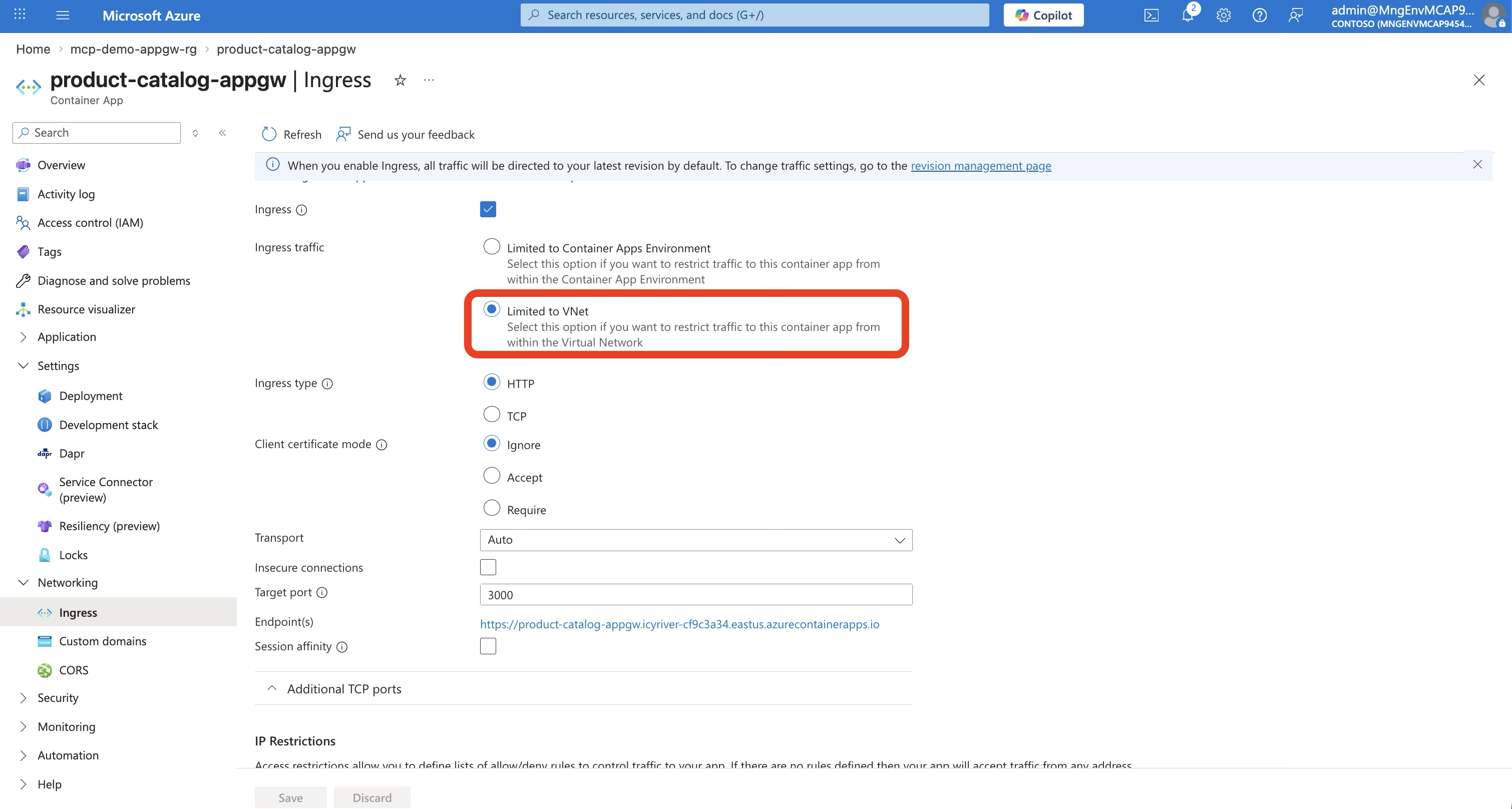
The Problem
You’ve built an MCP server on Azure API Management. It works. AI agents can discover and call your tools. But your security team has questions:
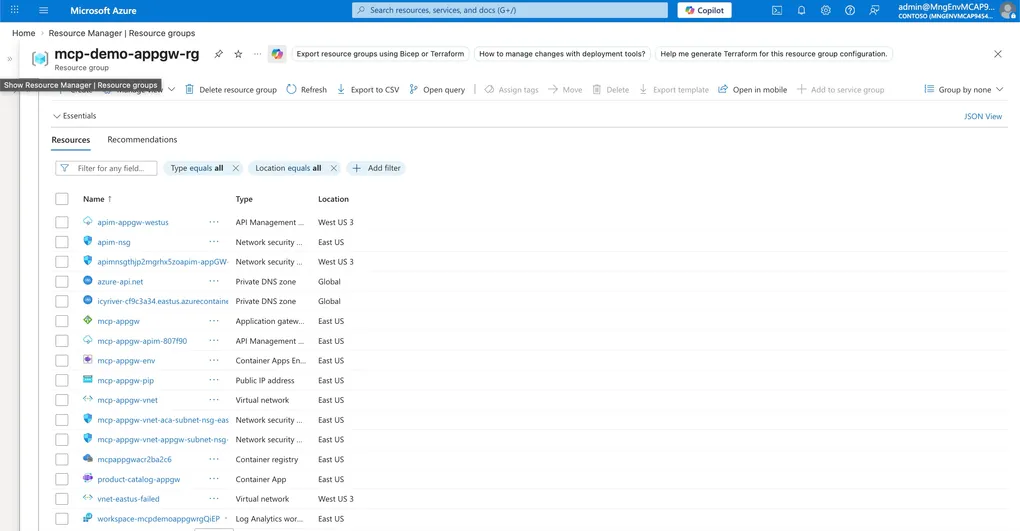
- “Why does APIM have a public IP?”
- “Where’s the WAF?”
- “Can we put this behind Application Gateway for DDoS protection?”
- “Does this meet our zero-trust requirements?”
Fair questions. In a basic public deployment (Scenario 1 — Public), both APIM and the Container App are internet-accessible — two public endpoints with no network isolation. In a VNet-integrated deployment (Scenario 2 — VNet), the Container App is private but APIM still has a public endpoint — better, but APIM is still directly reachable from the internet. Neither satisfies an enterprise security team.
📐 View Scenario 1 Architecture (Public)

📐 View Scenario 2 Architecture (VNet)

Scenario 3 fixes all of that: Application Gateway is the only thing touching the internet. Everything else is fully private.
What We’re Building

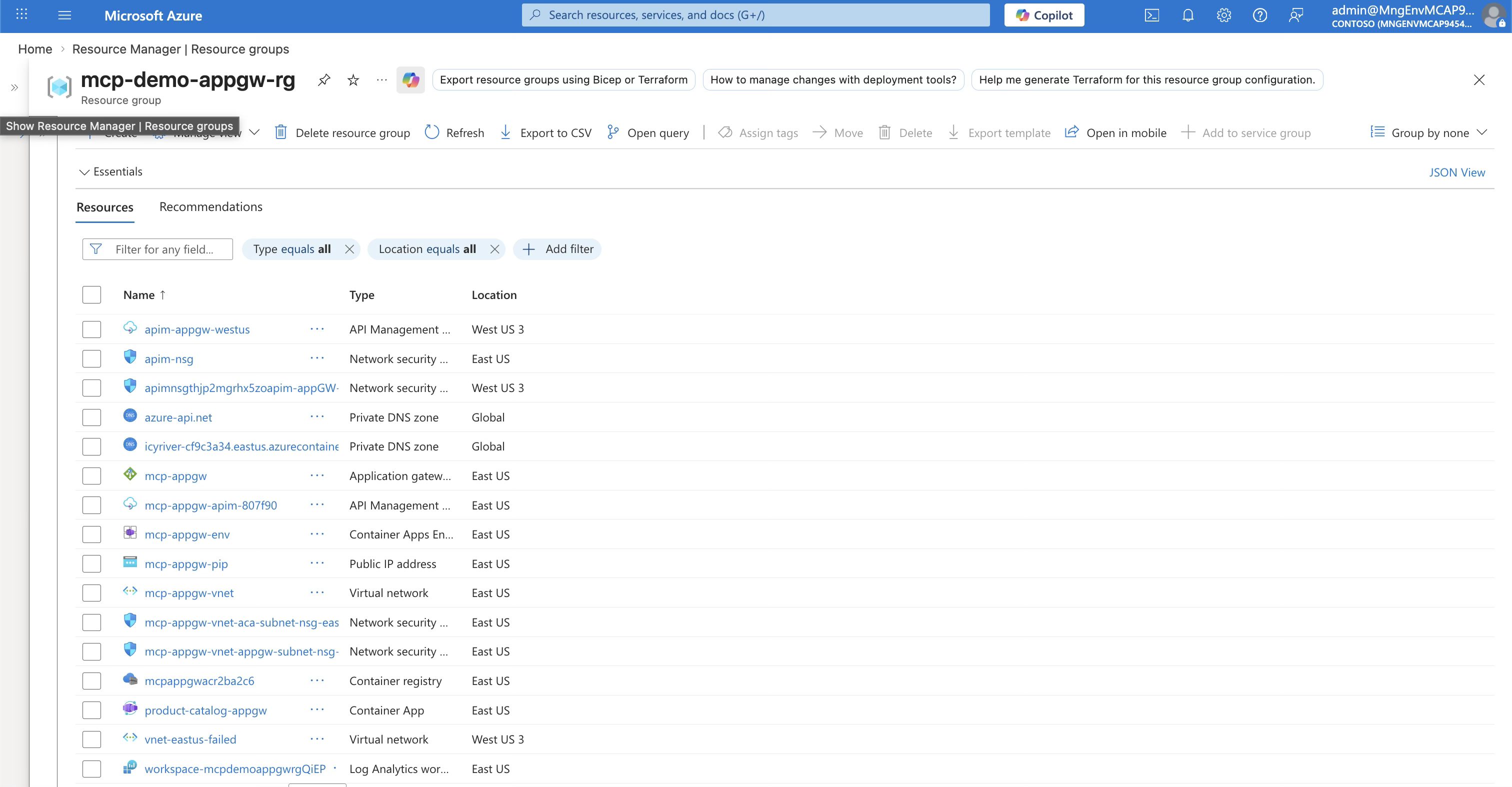
The traffic flow:

Three services, three subnets, one VNet — and only the Application Gateway has a public IP.
Why App Gateway + Internal APIM?
If you’re coming from Scenario 2 (VNet-integrated APIM in external mode), you might be wondering: why add another layer?
| Scenario 2 (VNet) | Scenario 3 (App Gateway) | |
|---|---|---|
| Internet entry point | APIM (external VNet mode) | App Gateway (public IP) |
| APIM exposure | Public + VNet (has public IP) | Internal VNet only (no public IP) |
| WAF protection | ❌ None | ✅ App Gateway WAF (OWASP rules) |
| DDoS protection | Basic | ✅ Standard (via App GW) |
| Public endpoints | 1 (APIM) | 1 (App Gateway) |
| API endpoint exposed? | Yes — APIM URL is public | No — APIM is fully private |
| Security rating | ⭐⭐⭐ | ⭐⭐⭐⭐⭐ |
The key difference: in Scenario 2, anyone who knows your APIM URL can send requests directly to it. In Scenario 3, APIM doesn’t have a URL on the internet at all. The only way in is through Application Gateway — which means WAF rules, DDoS protection, IP allowlisting, and SSL termination all happen before the request reaches APIM.
The Three Security Layers
This is what makes the pattern powerful — each layer handles a different dimension of security:
Layer 1: Application Gateway (Network Security)
| Capability | What It Does |
|---|---|
| WAF (OWASP 3.2) | Blocks SQL injection, XSS, and common web attacks |
| DDoS protection | Azure DDoS Standard integration |
| SSL termination | TLS 1.2+ with managed certificates |
| IP allowlisting | Restrict access to known client IP ranges |
| Custom routing | Path-based or host-based routing rules |
| Health probes | Monitors APIM backend availability |
Layer 2: API Management (Application Security)
| Capability | What It Does |
|---|---|
| JWT validation | Verifies Entra ID tokens (audience, issuer, signature) |
| Per-tool role checking | Extracts tool name from MCP JSON-RPC body, checks user roles |
| Rate limiting | Throttles requests per subscription/user |
| Request logging | Full audit trail of API and MCP calls |
| MCP ↔ REST translation | Converts MCP tool calls to REST API operations |
This is the layer where JWT validation, per-tool role extraction from MCP JSON-RPC bodies, and role-based access control happen — all enforced in APIM policies with zero code changes to the API itself. I covered this in depth in my previous post on securing MCP servers with Entra ID OAuth 2.0.
Layer 3: Container App (Isolation)
| Capability | What It Does |
|---|---|
| No public endpoint | VNet-only ingress — not accessible from the internet |
| Zero auth code | The API knows nothing about authentication |
| Minimal attack surface | Only port 3000, only responds to APIM’s subnet |
| Auto-scaling | 1-3 replicas based on load |
Step-by-Step Deployment
The full deployment is automated in deploy-appgw.sh — a 500-line script that provisions everything from scratch (Find the details at the end of this blog). Here’s what each step does and why.
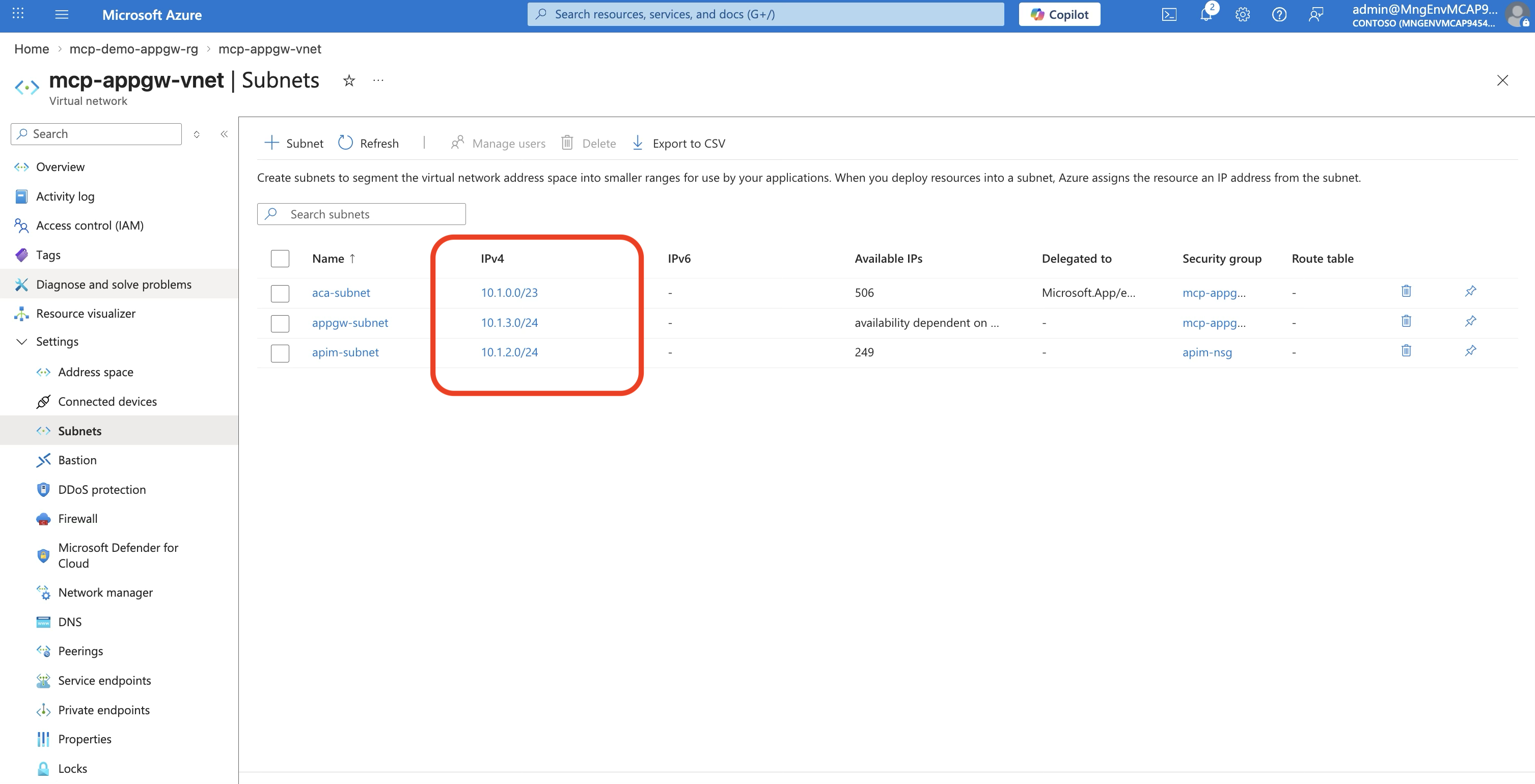
Step 1: Create the VNet with Three Subnets
# VNet: 10.1.0.0/16
az network vnet create \
  --name mcp-appgw-vnet \
  --address-prefix "10.1.0.0/16"

# Subnet 1: Container Apps (needs /23 minimum)
az network vnet subnet create \
  --name aca-subnet \
  --address-prefix "10.1.0.0/23" \
  --delegations "Microsoft.App/environments"

# Subnet 2: APIM (dedicated, no delegation)
az network vnet subnet create \
  --name apim-subnet \
  --address-prefix "10.1.2.0/24"

# Subnet 3: App Gateway (dedicated)
az network vnet subnet create \
  --name appgw-subnet \
  --address-prefix "10.1.3.0/24"
⚠️ Important: Container Apps environments require a
/23subnet (512 addresses). APIM and App Gateway each need a/24. Plan your address space accordingly.
Step 2: Deploy the Container App
There’s a subtle but critical two-layer concept here:
# Create environment — internal-only means the environment itself
# has NO public IP. It lives entirely inside the VNet.
az containerapp env create \
  --name mcp-appgw-env \
  --infrastructure-subnet-resource-id $ACA_SUBNET_ID \
  --internal-only true

# Deploy the app with "external" ingress — this does NOT mean
# internet-accessible. Within an internal-only environment,
# "external" means "reachable from other subnets in the VNet."
# Without this, APIM (in its own subnet) can't reach the app.
az containerapp create \
  --name product-catalog-appgw \
  --environment mcp-appgw-env \
  --image $ACR_NAME.azurecr.io/product-catalog-api:v1 \
  --target-port 3000 \
  --ingress external
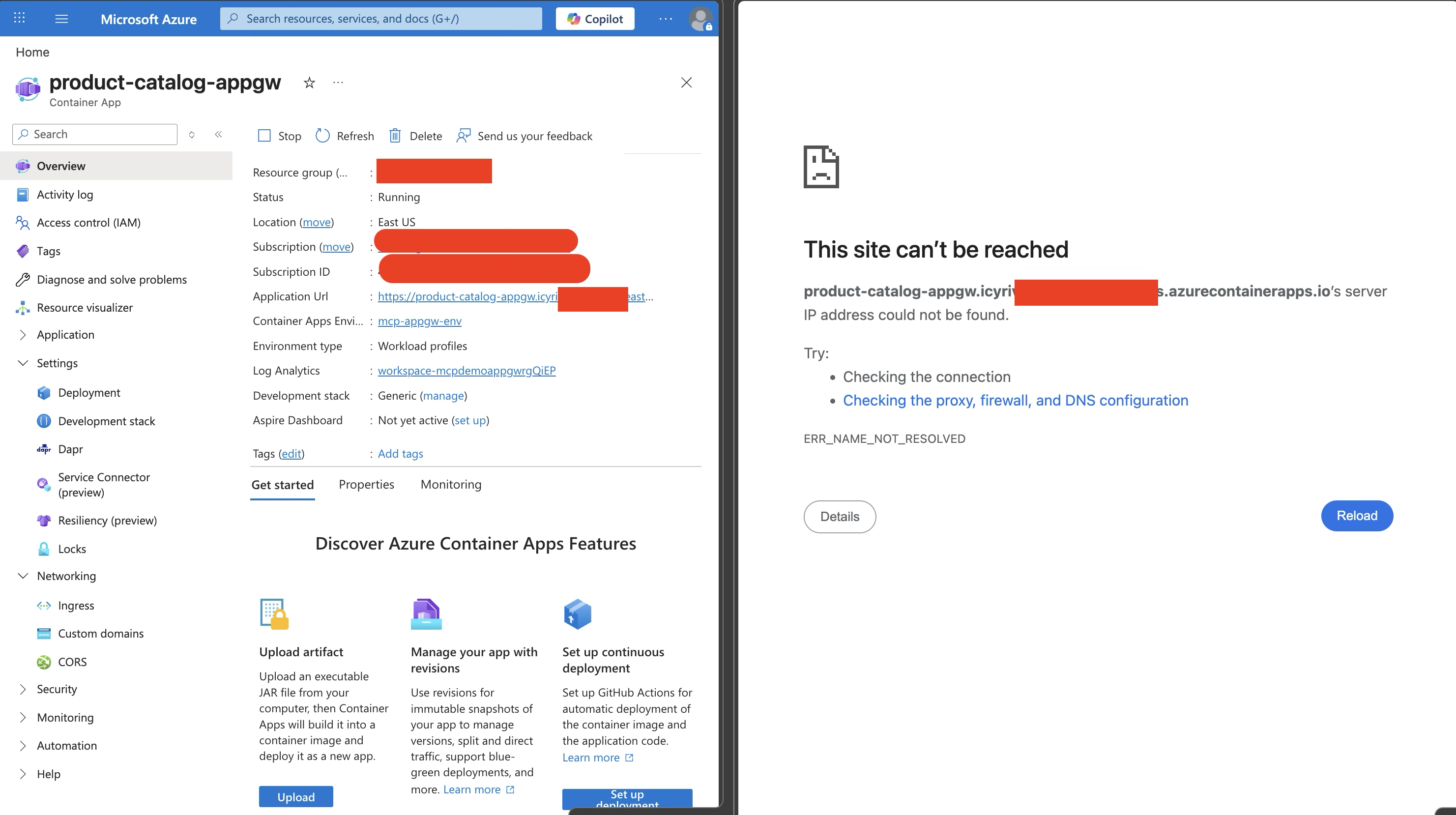
Why --internal-only true + --ingress external? This is the combination that trips people up:
| Setting | What It Controls | Value | Effect |
|---|---|---|---|
--internal-only | Environment network exposure | true | No public IP for the entire environment |
--ingress | App accessibility within the environment | external | Other subnets in the VNet can reach this app |
If you set --ingress internal instead, only other Container Apps within the same environment could reach it — APIM (which lives in a different subnet) would get connection refused.
The resulting FQDN looks like: product-catalog-appgw.icyri<>.eastus.azurecontainerapps.io. This looks like a public URL, but it isn’t — with --internal-only true, Azure does not create a public DNS record for it. The FQDN is just an identifier shown in the portal. It only resolves from within the VNet, via the Private DNS zone you configure in Step 4.
Step 3: Deploy APIM in Internal VNet Mode
az apim create \
  --name mcp-appgw-apim-XXXXXX \
  --sku-name Developer \
  --virtual-network-type Internal \
  --virtual-network $APIM_SUBNET_ID
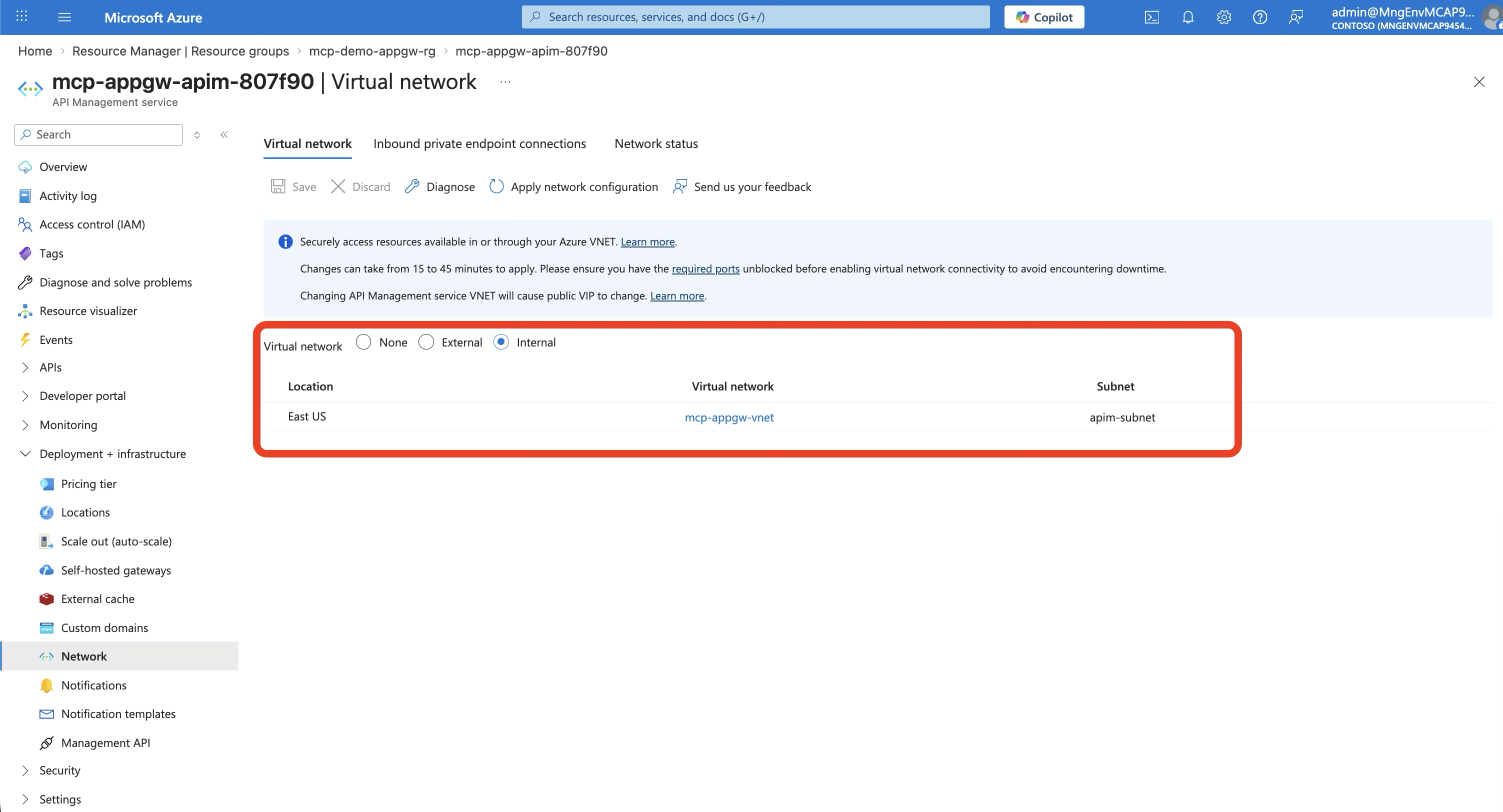
This is the biggest difference from Scenario 2. With --virtual-network-type Internal:
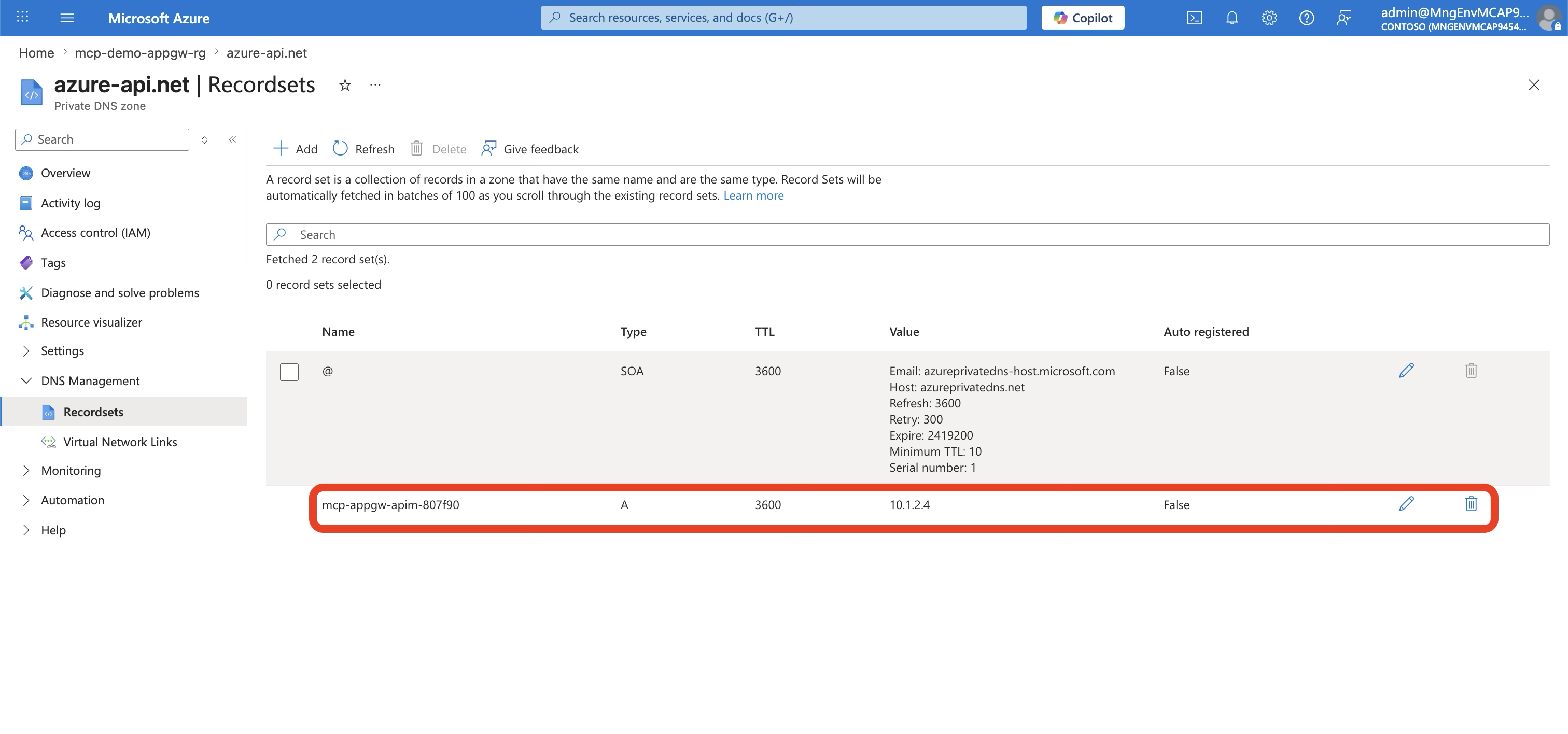
- APIM gets a private IP only (e.g., 10.1.2.4)
- There is no public endpoint
- The
*.azure-api.nethostname only resolves inside the VNet (via Private DNS) - APIM management plane is accessible only through the VNet or a connected network
⚠️ Deployment time: Internal VNet APIM takes 30-45 minutes to provision. This is normal. The Developer SKU is the minimum that supports VNet integration.
Step 4: Private DNS Configuration
Internal APIM requires Private DNS zones so that services within the VNet can resolve *.azure-api.net to the private IP:
# APIM DNS
az network private-dns zone create --name "azure-api.net"
az network private-dns record-set a add-record \
  --zone-name "azure-api.net" \
  --record-set-name "$APIM_NAME" \
  --ipv4-address "$APIM_PRIVATE_IP"

# Container App DNS (for APIM → ACA routing)
az network private-dns zone create \
  --name "$ACA_ENVIRONMENT_DOMAIN"
az network private-dns record-set a add-record \
  --zone-name "$ACA_ENVIRONMENT_DOMAIN" \
  --record-set-name "*" \
  --ipv4-address "$ACA_STATIC_IP"
⚠️ DNS note: The wildcard record
*resolves any app name under the environment domain to the static IP. Make sure the Private DNS zone is linked to the VNet — otherwise APIM can’t resolve the Container App hostname and requests will fail with connection errors. A common pitfall is creating the DNS zone but forgetting to link it to the VNet, or using the wrong record name (e.g.,*.internalinstead of*) — the exact record name depends on whether your Container App FQDN includes an.internal.subdomain segment.
Step 5: Import the API and Create the MCP Server
# Import OpenAPI spec into APIM
az apim api import \
  --service-name $APIM_NAME \
  --api-id product-catalog-appgw \
  --specification-format OpenApiJson \
  --specification-path openapi.json \
  --service-url "https://${APP_FQDN}" \
  --subscription-required false
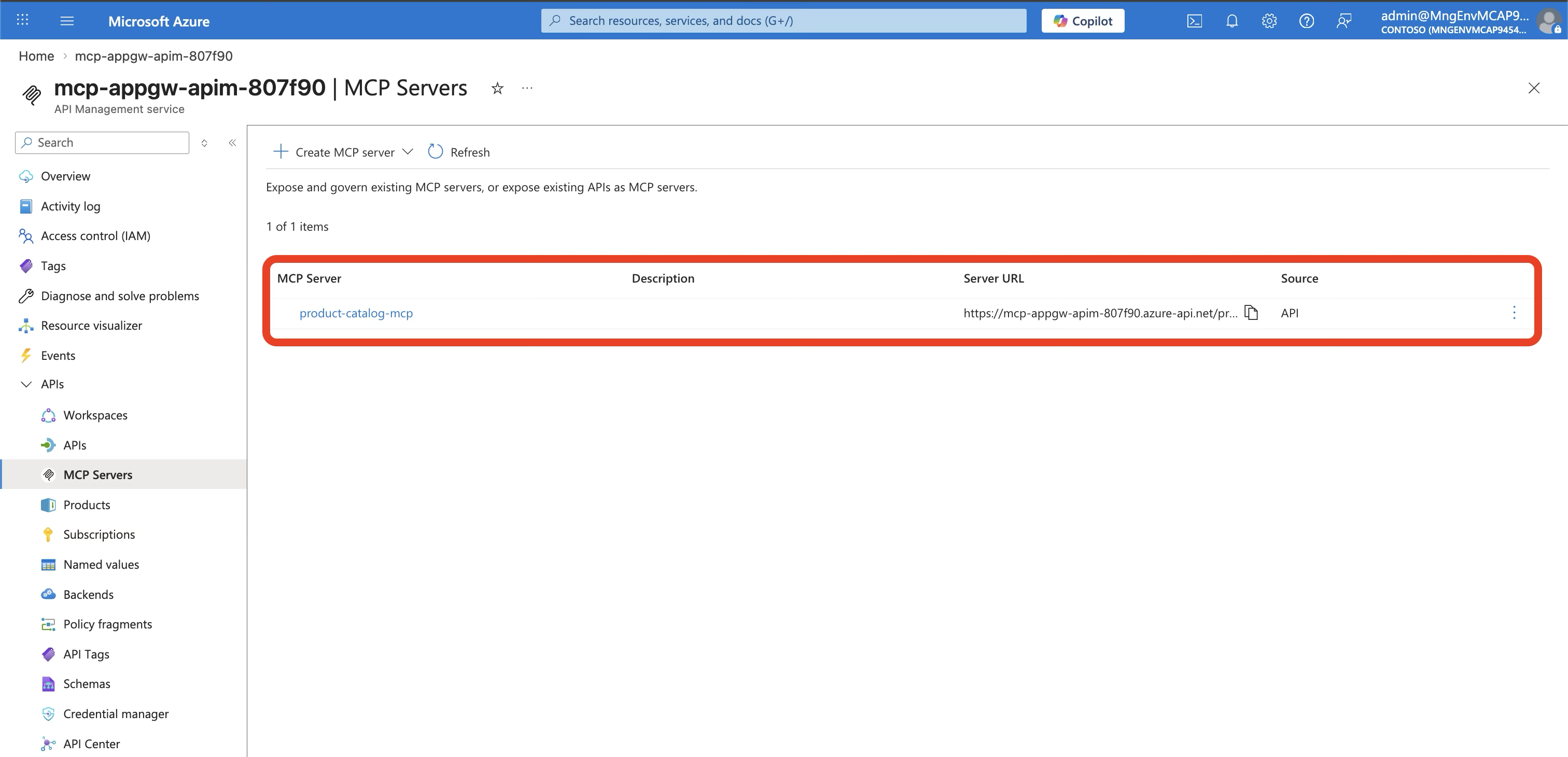
Then in the Azure Portal:
- Navigate to your APIM instance → MCP Servers
- Click + Create MCP server → Expose an API as MCP server
- Select the Product Catalog API and all its operations
- Click Create
Step 6: Deploy Application Gateway
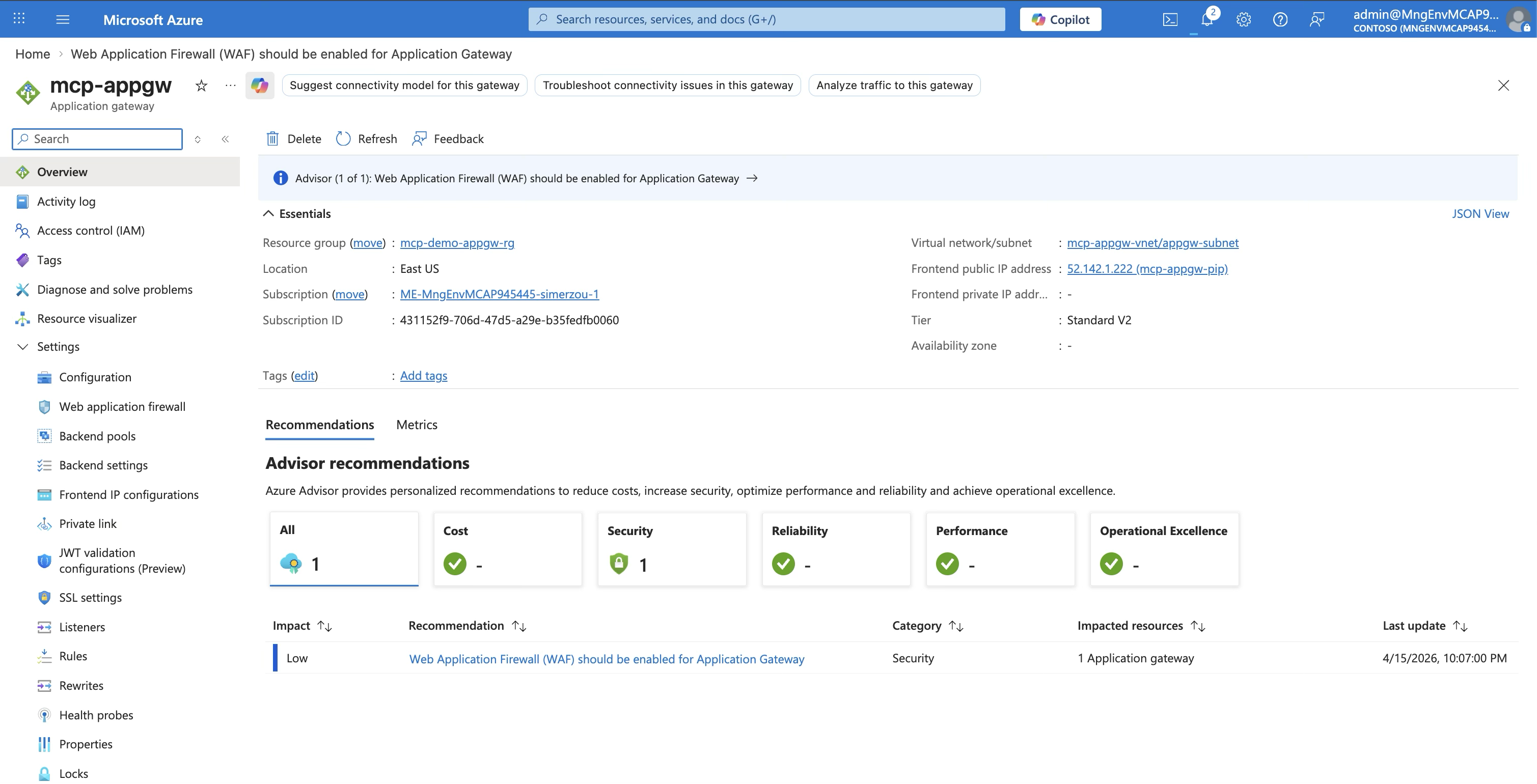
This is the public-facing entry point:
# Public IP
az network public-ip create \
  --name mcp-appgw-pip \
  --sku Standard \
  --allocation-method Static

# Application Gateway
az network application-gateway create \
  --name mcp-appgw \
  --sku Standard_v2 \
  --capacity 1 \
  --vnet-name mcp-appgw-vnet \
  --subnet appgw-subnet \
  --public-ip-address mcp-appgw-pip \
  --http-settings-port 443 \
  --http-settings-protocol Https \
  --servers "$APIM_PRIVATE_IP" \
  --frontend-port 80
Step 7: Configure App Gateway Backend Settings
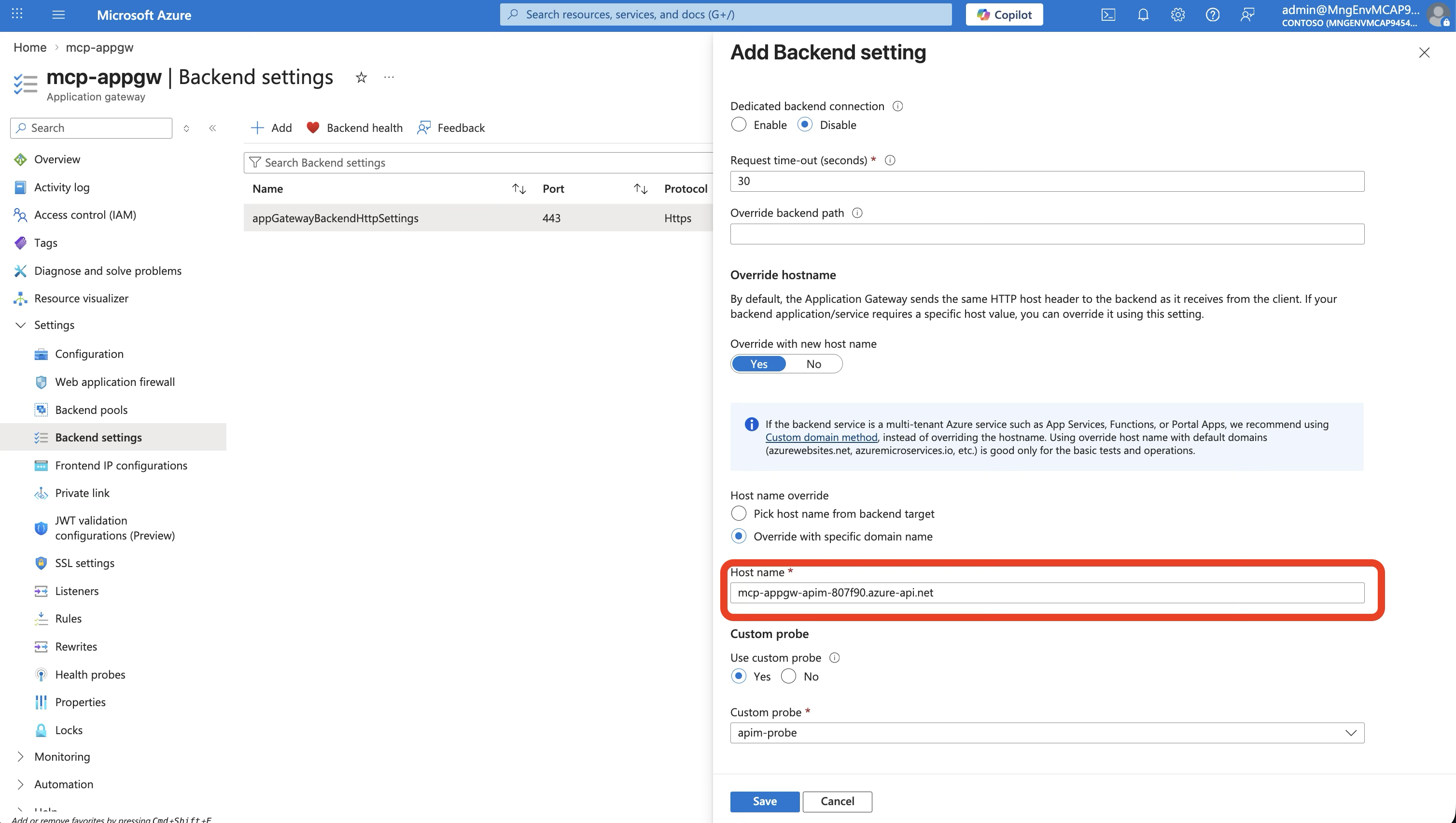
The App Gateway needs to send the correct hostname to APIM and monitor its health:
# Set host header to APIM's internal hostname
az network application-gateway http-settings update \
  --gateway-name mcp-appgw \
  --name appGatewayBackendHttpSettings \
  --host-name "${APIM_NAME}.azure-api.net" \
  --protocol Https --port 443

# Health probe using APIM's built-in status endpoint
az network application-gateway probe create \
  --gateway-name mcp-appgw \
  --name apim-probe \
  --protocol Https \
  --host "${APIM_NAME}.azure-api.net" \
  --path "/status-0123456789abcdef" \
  --interval 30 --timeout 30 --threshold 3
Why the host header matters: App Gateway connects to APIM by private IP, but APIM expects requests addressed to its
*.azure-api.nethostname. Without the host header override, APIM returns 404.
The Data Flow — End to End
Here’s what happens when a Copilot Studio agent calls listAllProducts:

Four hops, three security checks, zero public API endpoints. The Container App has no idea any of this is happening — it just serves JSON.
Connecting MCP Clients
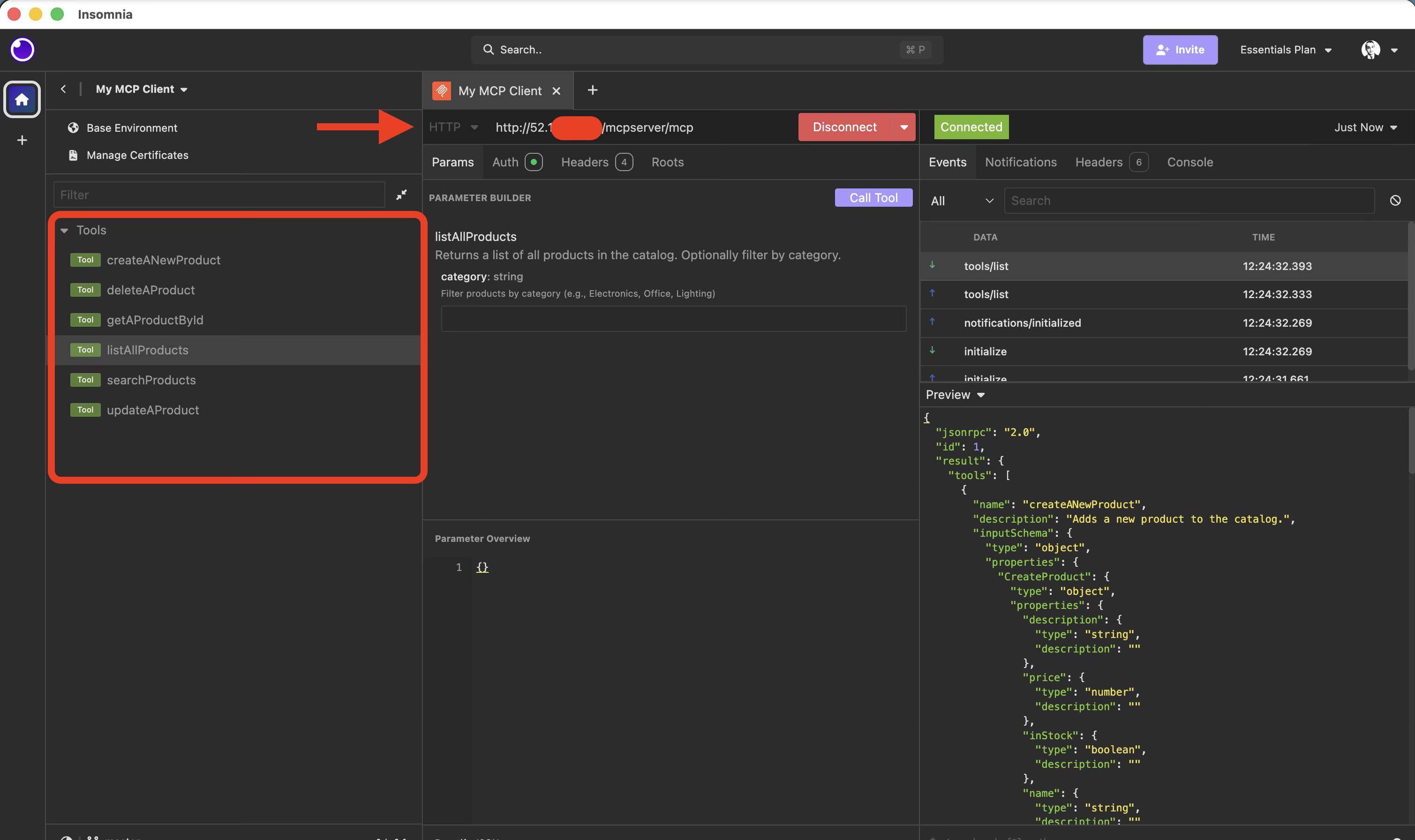
From the client’s perspective, the MCP endpoint is simply the App Gateway’s public IP:
MCP Endpoint: http://{APP_GATEWAY_PUBLIC_IP}/mcpMCP Inspector:
npx @modelcontextprotocol/inspector
# Transport: Streamable HTTP
# URL: http://{APP_GATEWAY_PUBLIC_IP}/mcp
Copilot Studio:
- Server URL:
http://{APP_GATEWAY_PUBLIC_IP}/mcp - Authentication: OAuth 2.0 (Entra ID) — configure with client ID, client secret, and your tenant’s authorization/token URLs. APIM validates the JWT and enforces per-tool role-based access.
GitHub Copilot (VS Code):
// settings.json
"mcp": {
  "servers": {
    "product-catalog": {
      "type": "http",
      "url": "http://{APP_GATEWAY_PUBLIC_IP}/mcp"
    }
  }
}
All Three Scenarios Compared
| Scenario 1 (Public) | Scenario 2 (VNet) | Scenario 3 (App Gateway) | |
|---|---|---|---|
| Internet entry | APIM (public) | APIM (external VNet) | App Gateway (public IP) |
| APIM exposure | Public endpoint, no VNet | Public + VNet | Internal VNet, no public endpoint |
| Container App | External ingress (public) | External ingress (VNet-only) | External ingress (VNet-only) |
| WAF | ❌ None | ❌ None | ✅ App Gateway WAF |
| DDoS | Basic | Basic | ✅ Standard |
| Public endpoints | 2 (APIM + ACA) | 1 (APIM) | 1 (App Gateway only) |
| Security level | ⭐⭐ | ⭐⭐⭐ | ⭐⭐⭐⭐⭐ |
| Complexity | Low | Medium | High |
| Deployment time | ~15 min | ~40 min | ~50 min |
| MCP endpoint | APIM public URL /mcp | APIM public URL /mcp | App GW public IP /mcp |
Hard-Won Lessons
1. APIM Internal Mode Takes Forever
Internal VNet APIM provisioning takes 30-45 minutes. Don’t cancel and retry — the deployment is working, it’s just slow. Use this time to set up the other resources.
2. The Host Header Is Non-Negotiable
App Gateway connects to APIM by private IP, but APIM routes based on the Host header. If you forget to set --host-name "${APIM_NAME}.azure-api.net" on the backend HTTP settings, every request returns 404.
3. Private DNS Is Critical — And Easy to Get Wrong
Internal APIM requires a Private DNS zone for azure-api.net linked to your VNet. Without it, App Gateway can’t resolve APIM’s hostname and the health probe fails permanently.
Container Apps also need a Private DNS zone for their environment domain. A wildcard * A record pointing to the environment’s static IP ensures APIM can resolve any app in the environment. If the DNS zone isn’t linked to the VNet or the record name is wrong, APIM will fail to connect to the Container App with cryptic timeout errors.
4. --internal-only vs --ingress Are Different Things
The Container Apps environment’s --internal-only true removes the public IP from the environment. The app’s --ingress external makes it reachable from other VNet subnets (like APIM’s). If you accidentally set --ingress internal, APIM won’t be able to reach the Container App even though they share a VNet — because internal ingress restricts access to only other apps in the same Container Apps environment.
5. Health Probe Path Matters
APIM’s health endpoint is /status-0123456789abcdef — a fixed path that returns 200 when APIM is healthy. Don’t use / or /mcp as your health probe path — they require authentication and will return 401, making App Gateway think the backend is down.
6. App Gateway Needs the APIM Certificate
When App Gateway connects to APIM over HTTPS (which it should), it needs to trust APIM’s TLS certificate. For Developer SKU APIM with the default *.azure-api.net certificate, this usually works out of the box. For custom domains, you’ll need to upload the root CA to App Gateway’s trusted root certificates.
When to Use This Pattern
Use Scenario 3 when:
- Your organization requires WAF protection for all public endpoints
- Compliance mandates zero public API endpoints (only WAF-fronted entry points)
- You need DDoS Standard protection
- You want IP allowlisting at the network edge
- You’re operating in a regulated industry (finance, healthcare, government)
Stick with Scenario 2 when:
- WAF isn’t required
- You want simpler operations (fewer moving parts)
- Cost is a concern (App Gateway Standard_v2 starts at ~$250/mo)
Stick with Scenario 1 when:
- You’re prototyping or in development
- Security requirements are minimal
- Speed of deployment matters most
Summary
| Layer | Service | What It Does |
|---|---|---|
| Edge | Application Gateway | WAF, DDoS, SSL termination, IP filtering |
| API | API Management (Internal) | JWT validation, per-tool role checking, MCP↔REST translation |
| Compute | Container Apps | Runs the API — knows nothing about networking or auth |
| Identity | Entra ID | OAuth 2.0 tokens, app roles, group-based access |
| Network | VNet + Private DNS | Isolates everything, resolves private hostnames |
The beauty of this pattern is separation of concerns. The API code doesn’t change between scenarios — it’s the same Express app in all three. Security, networking, and access control are all handled by infrastructure.
The deployment script (500 lines of Azure CLI) provisions everything from scratch — VNet, subnets, ACR, Container App, APIM, DNS zones, App Gateway, and routing. For the full auth setup (Entra ID app registrations, app roles, APIM policies), see my companion post on securing MCP servers with OAuth 2.0.
Full Deployment Script
The complete 500-line deployment script that provisions everything from scratch:
📜 Click to expand deploy-appgw.sh (512 lines)
#!/usr/bin/env bash
#
# Scenario 3: App Gateway → APIM (Internal VNet) → Container App (VNet)
#
# Architecture:
#   [Internet] → [App Gateway (public, WAF)] → [APIM (internal VNet)]
#                                                       ↓
#                                              [Container App (VNet-only)]
#
# The MCP endpoint is exposed through App Gateway.
#
# Usage: ./scripts/deploy-appgw.sh
#
set -euo pipefail

#-----------------------------------------------------------------------
# Configuration
#-----------------------------------------------------------------------
RESOURCE_GROUP="mcp-demo-appgw-rg"
LOCATION="eastus"
ACR_NAME="mcpappgwacr$(openssl rand -hex 3)"
VNET_NAME="mcp-appgw-vnet"
ACA_SUBNET_NAME="aca-subnet"
APIM_SUBNET_NAME="apim-subnet"
APPGW_SUBNET_NAME="appgw-subnet"
ACA_ENV_NAME="mcp-appgw-env"
ACA_APP_NAME="product-catalog-appgw"
APIM_NAME="mcp-appgw-apim-$(openssl rand -hex 3)"
APPGW_NAME="mcp-appgw"
APPGW_PIP_NAME="mcp-appgw-pip"
APIM_ORG="MCP Demo AppGW"
APIM_EMAIL="admin@mcpdemo.com"
API_ID="product-catalog-appgw"
IMAGE_TAG="product-catalog-api:v1"

echo "======================================================="
echo " Scenario 3: App Gateway → APIM (Internal) → ACA"
echo "======================================================="

#-----------------------------------------------------------------------
# Step 1: Create Resource Group
#-----------------------------------------------------------------------
echo ""
echo "▶ Step 1: Creating resource group '$RESOURCE_GROUP'..."
az group create --name "$RESOURCE_GROUP" --location "$LOCATION" --output none
echo "  ✅ Resource group created."

#-----------------------------------------------------------------------
# Step 2: Create VNet with 3 subnets
#-----------------------------------------------------------------------
echo ""
echo "▶ Step 2: Creating VNet with 3 subnets..."
az network vnet create \
  --resource-group "$RESOURCE_GROUP" \
  --name "$VNET_NAME" \
  --address-prefix "10.1.0.0/16" \
  --location "$LOCATION" \
  --output none

# ACA subnet
az network vnet subnet create \
  --resource-group "$RESOURCE_GROUP" \
  --vnet-name "$VNET_NAME" \
  --name "$ACA_SUBNET_NAME" \
  --address-prefix "10.1.0.0/23" \
  --delegations "Microsoft.App/environments" \
  --output none

# APIM subnet
az network vnet subnet create \
  --resource-group "$RESOURCE_GROUP" \
  --vnet-name "$VNET_NAME" \
  --name "$APIM_SUBNET_NAME" \
  --address-prefix "10.1.2.0/24" \
  --output none

# App Gateway subnet
az network vnet subnet create \
  --resource-group "$RESOURCE_GROUP" \
  --vnet-name "$VNET_NAME" \
  --name "$APPGW_SUBNET_NAME" \
  --address-prefix "10.1.3.0/24" \
  --output none

ACA_SUBNET_ID=$(az network vnet subnet show \
  --resource-group "$RESOURCE_GROUP" --vnet-name "$VNET_NAME" \
  --name "$ACA_SUBNET_NAME" --query id -o tsv)

APIM_SUBNET_ID=$(az network vnet subnet show \
  --resource-group "$RESOURCE_GROUP" --vnet-name "$VNET_NAME" \
  --name "$APIM_SUBNET_NAME" --query id -o tsv)

echo "  ✅ VNet and subnets created."
echo "      ACA subnet:     10.1.0.0/23"
echo "      APIM subnet:    10.1.2.0/24"
echo "      App GW subnet:  10.1.3.0/24"

#-----------------------------------------------------------------------
# Step 3: Create ACR + Build image
#-----------------------------------------------------------------------
echo ""
echo "▶ Step 3: Creating ACR and building image..."
az acr create \
  --resource-group "$RESOURCE_GROUP" \
  --name "$ACR_NAME" \
  --sku Basic \
  --admin-enabled true \
  --output none

az acr build \
  --registry "$ACR_NAME" \
  --image "$IMAGE_TAG" \
  --file Dockerfile . \
  --no-logs
echo "  ✅ Image built and pushed."

#-----------------------------------------------------------------------
# Step 4: Create Container Apps environment (internal)
#-----------------------------------------------------------------------
echo ""
echo "▶ Step 4: Creating internal Container Apps environment..."
az containerapp env create \
  --resource-group "$RESOURCE_GROUP" \
  --name "$ACA_ENV_NAME" \
  --location "$LOCATION" \
  --infrastructure-subnet-resource-id "$ACA_SUBNET_ID" \
  --internal-only true \
  --output none

ACA_DEFAULT_DOMAIN=$(az containerapp env show \
  --resource-group "$RESOURCE_GROUP" --name "$ACA_ENV_NAME" \
  --query "properties.defaultDomain" -o tsv)

ACA_STATIC_IP=$(az containerapp env show \
  --resource-group "$RESOURCE_GROUP" --name "$ACA_ENV_NAME" \
  --query "properties.staticIp" -o tsv)

echo "  ✅ ACA environment created."
echo "      Domain: $ACA_DEFAULT_DOMAIN"
echo "      IP:     $ACA_STATIC_IP"

#-----------------------------------------------------------------------
# Step 5: Deploy Container App (external ingress = VNet-accessible)
#-----------------------------------------------------------------------
echo ""
echo "▶ Step 5: Deploying Container App..."
ACR_LOGIN_SERVER="${ACR_NAME}.azurecr.io"
ACR_PASSWORD=$(az acr credential show --name "$ACR_NAME" --query "passwords[0].value" -o tsv)

az containerapp create \
  --resource-group "$RESOURCE_GROUP" \
  --name "$ACA_APP_NAME" \
  --environment "$ACA_ENV_NAME" \
  --image "${ACR_LOGIN_SERVER}/${IMAGE_TAG}" \
  --registry-server "$ACR_LOGIN_SERVER" \
  --registry-username "$ACR_NAME" \
  --registry-password "$ACR_PASSWORD" \
  --target-port 3000 \
  --ingress external \
  --min-replicas 1 \
  --max-replicas 3 \
  --output none

APP_FQDN=$(az containerapp show \
  --resource-group "$RESOURCE_GROUP" --name "$ACA_APP_NAME" \
  --query "properties.configuration.ingress.fqdn" -o tsv)

echo "  ✅ Container App deployed: https://${APP_FQDN}"
echo "     (VNet-only, not internet-accessible)"

#-----------------------------------------------------------------------
# Step 6: Private DNS for Container Apps
#-----------------------------------------------------------------------
echo ""
echo "▶ Step 6: Setting up Private DNS..."
az network private-dns zone create \
  --resource-group "$RESOURCE_GROUP" \
  --name "$ACA_DEFAULT_DOMAIN" \
  --output none

az network private-dns link vnet create \
  --resource-group "$RESOURCE_GROUP" \
  --zone-name "$ACA_DEFAULT_DOMAIN" \
  --name "aca-dns-link" \
  --virtual-network "$VNET_NAME" \
  --registration-enabled false \
  --output none

az network private-dns record-set a add-record \
  --resource-group "$RESOURCE_GROUP" \
  --zone-name "$ACA_DEFAULT_DOMAIN" \
  --record-set-name "*" \
  --ipv4-address "$ACA_STATIC_IP" \
  --output none

echo "  ✅ Private DNS configured."

#-----------------------------------------------------------------------
# Step 7: NSG + Service Endpoints for APIM subnet
#-----------------------------------------------------------------------
echo ""
echo "▶ Step 7: Configuring NSG and service endpoints..."

az network vnet subnet update \
  --resource-group "$RESOURCE_GROUP" \
  --vnet-name "$VNET_NAME" \
  --name "$APIM_SUBNET_NAME" \
  --service-endpoints Microsoft.EventHub Microsoft.KeyVault Microsoft.ServiceBus Microsoft.Sql Microsoft.Storage \
  --output none

az network nsg create \
  --resource-group "$RESOURCE_GROUP" \
  --name "apim-nsg" \
  --location "$LOCATION" \
  --output none

az network nsg rule create \
  --resource-group "$RESOURCE_GROUP" \
  --nsg-name "apim-nsg" \
  --name "AllowAPIMManagement" \
  --priority 100 --direction Inbound --access Allow --protocol Tcp \
  --source-address-prefixes ApiManagement \
  --destination-port-ranges 3443 \
  --output none

az network nsg rule create \
  --resource-group "$RESOURCE_GROUP" \
  --nsg-name "apim-nsg" \
  --name "AllowAppGateway" \
  --priority 110 --direction Inbound --access Allow --protocol Tcp \
  --source-address-prefixes "10.1.3.0/24" \
  --destination-port-ranges 443 \
  --output none

az network vnet subnet update \
  --resource-group "$RESOURCE_GROUP" \
  --vnet-name "$VNET_NAME" \
  --name "$APIM_SUBNET_NAME" \
  --network-security-group "apim-nsg" \
  --output none

echo "  ✅ NSG and service endpoints configured."

#-----------------------------------------------------------------------
# Step 7b: NSG for App Gateway subnet (allow HTTP:80 inbound)
#-----------------------------------------------------------------------
echo ""
echo "▶ Step 7b: Configuring App Gateway subnet NSG..."
az network nsg create \
  --resource-group "$RESOURCE_GROUP" \
  --name "appgw-nsg" \
  --location "$LOCATION" \
  --output none

az network nsg rule create \
  --resource-group "$RESOURCE_GROUP" \
  --nsg-name "appgw-nsg" \
  --name "AllowHTTP" \
  --priority 100 --direction Inbound --access Allow --protocol Tcp \
  --source-address-prefixes Internet \
  --destination-port-ranges 80 \
  --output none

az network nsg rule create \
  --resource-group "$RESOURCE_GROUP" \
  --nsg-name "appgw-nsg" \
  --name "AllowGatewayManager" \
  --priority 200 --direction Inbound --access Allow --protocol Tcp \
  --source-address-prefixes GatewayManager \
  --destination-port-ranges 65200-65535 \
  --output none

az network vnet subnet update \
  --resource-group "$RESOURCE_GROUP" \
  --vnet-name "$VNET_NAME" \
  --name "$APPGW_SUBNET_NAME" \
  --network-security-group "appgw-nsg" \
  --output none

echo "  ✅ App Gateway NSG configured (HTTP:80 + GatewayManager)."

#-----------------------------------------------------------------------
# Step 8: Create APIM (Internal VNet mode)
#-----------------------------------------------------------------------
echo ""
echo "▶ Step 8: Creating APIM with Internal VNet mode..."
echo "  ⏳ This takes 30-45 minutes..."

az apim create \
  --resource-group "$RESOURCE_GROUP" \
  --name "$APIM_NAME" \
  --publisher-name "$APIM_ORG" \
  --publisher-email "$APIM_EMAIL" \
  --sku-name Developer \
  --location "$LOCATION" \
  --output none

echo "  ✅ APIM instance created. Applying VNet integration..."

az apim update \
  --resource-group "$RESOURCE_GROUP" \
  --name "$APIM_NAME" \
  --virtual-network Internal \
  --set "virtualNetworkConfiguration.subnetResourceId=$APIM_SUBNET_ID" \
  --output none

APIM_PRIVATE_IP=$(az apim show \
  --resource-group "$RESOURCE_GROUP" --name "$APIM_NAME" \
  --query "privateIpAddresses[0]" -o tsv 2>/dev/null || echo "pending")

echo "  ✅ APIM deployed (Internal VNet mode)."
echo "      Private IP: $APIM_PRIVATE_IP"
echo "      Gateway:    ${APIM_NAME}.azure-api.net (VNet-only)"

#-----------------------------------------------------------------------
# Step 9: Private DNS for APIM
#-----------------------------------------------------------------------
echo ""
echo "▶ Step 9: Setting up Private DNS for APIM..."

# Internal APIM requires private DNS to resolve *.azure-api.net within the VNet
az network private-dns zone create \
  --resource-group "$RESOURCE_GROUP" \
  --name "azure-api.net" \
  --output none

az network private-dns link vnet create \
  --resource-group "$RESOURCE_GROUP" \
  --zone-name "azure-api.net" \
  --name "apim-dns-link" \
  --virtual-network "$VNET_NAME" \
  --registration-enabled false \
  --output none

# Re-fetch private IP (might not have been available immediately)
APIM_PRIVATE_IP=$(az apim show \
  --resource-group "$RESOURCE_GROUP" --name "$APIM_NAME" \
  --query "privateIpAddresses[0]" -o tsv)

az network private-dns record-set a add-record \
  --resource-group "$RESOURCE_GROUP" \
  --zone-name "azure-api.net" \
  --record-set-name "$APIM_NAME" \
  --ipv4-address "$APIM_PRIVATE_IP" \
  --output none

echo "  ✅ APIM Private DNS configured."
echo "      ${APIM_NAME}.azure-api.net → $APIM_PRIVATE_IP"

#-----------------------------------------------------------------------
# Step 10: Import API into APIM
#-----------------------------------------------------------------------
echo ""
echo "▶ Step 10: Importing API into APIM..."

az apim api import \
  --resource-group "$RESOURCE_GROUP" \
  --service-name "$APIM_NAME" \
  --api-id "$API_ID" \
  --path "products" \
  --specification-format OpenApiJson \
  --specification-path "openapi.json" \
  --service-url "https://${APP_FQDN}" \
  --display-name "Product Catalog API (AppGW)" \
  --protocols https \
  --subscription-required false \
  --output none

echo "  ✅ API imported."

#-----------------------------------------------------------------------
# Step 11: Create App Gateway (public-facing)
#-----------------------------------------------------------------------
echo ""
echo "▶ Step 11: Creating Application Gateway..."

# Public IP for App Gateway
az network public-ip create \
  --resource-group "$RESOURCE_GROUP" \
  --name "$APPGW_PIP_NAME" \
  --sku Standard \
  --allocation-method Static \
  --location "$LOCATION" \
  --output none

APPGW_PIP=$(az network public-ip show \
  --resource-group "$RESOURCE_GROUP" --name "$APPGW_PIP_NAME" \
  --query ipAddress -o tsv)

echo "  App Gateway Public IP: $APPGW_PIP"

# Create App Gateway with APIM as backend
az network application-gateway create \
  --resource-group "$RESOURCE_GROUP" \
  --name "$APPGW_NAME" \
  --location "$LOCATION" \
  --sku Standard_v2 \
  --capacity 1 \
  --vnet-name "$VNET_NAME" \
  --subnet "$APPGW_SUBNET_NAME" \
  --public-ip-address "$APPGW_PIP_NAME" \
  --http-settings-port 443 \
  --http-settings-protocol Https \
  --frontend-port 80 \
  --servers "$APIM_PRIVATE_IP" \
  --priority 100 \
  --output none

echo "  ✅ App Gateway created."

#-----------------------------------------------------------------------
# Step 12: Configure App Gateway for APIM backend
#-----------------------------------------------------------------------
echo ""
echo "▶ Step 12: Configuring App Gateway routing to APIM..."

# Update backend HTTP settings to use APIM hostname
az network application-gateway http-settings update \
  --resource-group "$RESOURCE_GROUP" \
  --gateway-name "$APPGW_NAME" \
  --name "appGatewayBackendHttpSettings" \
  --host-name "${APIM_NAME}.azure-api.net" \
  --protocol Https \
  --port 443 \
  --output none

# Create a health probe for APIM
az network application-gateway probe create \
  --resource-group "$RESOURCE_GROUP" \
  --gateway-name "$APPGW_NAME" \
  --name "apim-probe" \
  --protocol Https \
  --host "${APIM_NAME}.azure-api.net" \
  --path "/status-0123456789abcdef" \
  --interval 30 \
  --timeout 30 \
  --threshold 3 \
  --output none

# Associate probe with HTTP settings
az network application-gateway http-settings update \
  --resource-group "$RESOURCE_GROUP" \
  --gateway-name "$APPGW_NAME" \
  --name "appGatewayBackendHttpSettings" \
  --probe "apim-probe" \
  --output none

echo "  ✅ App Gateway configured to route to APIM."

#-----------------------------------------------------------------------
# Step 13: MCP Server Setup Instructions
#-----------------------------------------------------------------------
echo ""
echo "▶ Step 13: Exposing API as MCP Server..."
echo ""
echo "  📋 MANUAL STEP (Portal):"
echo "  ─────────────────────────────────────────────────"
echo "  1. Azure Portal → APIM: ${APIM_NAME}"
echo "  2. MCP Servers → + Create MCP server"
echo "  3. Expose an API as MCP server"
echo "  4. Select 'Product Catalog API (AppGW)'"
echo "  5. Select all operations → Create"
echo "  ─────────────────────────────────────────────────"
echo ""

#-----------------------------------------------------------------------
# Summary
#-----------------------------------------------------------------------
echo "======================================================="
echo " DEPLOYMENT COMPLETE — Scenario 3 (App Gateway)"
echo "======================================================="
echo ""
echo " Resource Group:    $RESOURCE_GROUP"
echo " VNet:              $VNET_NAME (10.1.0.0/16)"
echo ""
echo " Container App:     https://${APP_FQDN}"
echo "                    (VNet-only, not internet-accessible)"
echo ""
echo " APIM:              ${APIM_NAME}.azure-api.net"
echo "                    (Internal VNet, private IP: $APIM_PRIVATE_IP)"
echo ""
echo " App Gateway:       http://${APPGW_PIP}  (public)"
echo "                    Routes to APIM internal endpoint"
echo ""
echo " Architecture:"
echo "   [Internet] → [App GW :${APPGW_PIP}] → [APIM (internal)] → [Container App]"
echo ""
echo " MCP Endpoint (after portal step):"
echo "   http://${APPGW_PIP}/mcp"
echo ""
echo " Test with MCP Inspector:"
echo "   npx @modelcontextprotocol/inspector"
echo "   → Transport: Streamable HTTP"
echo "   → URL: http://${APPGW_PIP}/mcp"
echo ""

# Save outputs
cat > scripts/.env-appgw <<EOF
RESOURCE_GROUP=$RESOURCE_GROUP
VNET_NAME=$VNET_NAME
ACR_NAME=$ACR_NAME
ACA_ENV_NAME=$ACA_ENV_NAME
ACA_APP_NAME=$ACA_APP_NAME
APIM_NAME=$APIM_NAME
APIM_PRIVATE_IP=$APIM_PRIVATE_IP
APPGW_NAME=$APPGW_NAME
APPGW_PIP=$APPGW_PIP
APP_FQDN=$APP_FQDN
MCP_ENDPOINT=http://${APPGW_PIP}/mcp
EOF

echo " Environment saved to scripts/.env-appgw"
Happy hacking! In the next post, I’ll show you how to secure this architecture with Entra ID and APIM policies for OAuth 2.0 authentication and per-tool authorization.
Related Posts
Securing Your MCP Servers with Azure API Management and Entra ID
How to add OAuth 2.0 authentication and role-based authorization to MCP servers — so your AI tools only do what users are allowed to do.

Fast Lane or Pit Stop? 🏎️💨
Should You Use Azure OpenAI Realtime API — and When to Hit the Brakes
Azure OpenAI Realtime API w/ a .NET + React
What if your AI side-kick could answer *before* you finish talking?